Ollama can now generate audio from text. The platform’s first voice model is Phonon, from French startup Gradium: compact, runs locally, and comes in Portuguese, English, Spanish, French, and German.
Ollama now supports text-to-speech
On October 24, Ollama announced support for text-to-speech (TTS) models, the kind that turn text into speech. The first model available is Phonon, a family of compact voice models built by Gradium, a French startup specializing in voice AI.
The news stands out because of Ollama’s weight in the ecosystem. With more than 180,000 stars on GitHub, the project has become one of the largest repositories of open models and one of the main entry points for anyone who wants to run AI locally, on their own computer, without relying on an external API. Gemma, Qwen, Llama, and DeepSeek are a single command away.
Until now, though, Ollama was synonymous with models that read and write text. With voice support, the platform now covers the speech step as well: a language model writes the answer and Phonon turns it into audio, all on the same machine and without any data leaving the computer.
Who is Gradium
Gradium is a Paris-based startup founded in September 2025 as a spin-off of Kyutai, a French nonprofit AI research lab funded by billionaire Xavier Niel and known for Moshi, one of the first open real-time voice conversation models. The company is led by Neil Zeghidour, a founding member of Kyutai and a former voice model researcher at Google DeepMind.

Gradium’s goal is to build voice models with very low latency, so that assistants and agents can respond almost instantly. Its portfolio includes real-time text-to-speech and speech-to-text models, the Gradium Translate voice translator, Gradbot, an open-source framework for building voice agents, and now Phonon, designed to run directly on the device.
Phonon: quality voice in under 50 million parameters
Gradium released Phonon’s weights on October 20. These are tiny models by today’s standards: the smallest has 31 million parameters and the others have 40 million, while local language models usually have billions. On Ollama, downloads range from 104 MB to 148 MB, and the model takes up between 120 MB and 140 MB of memory once loaded.
Despite its size, Phonon promises the quality of larger models. In blind preference tests with more than 1,100 raters and 17,000 votes, Gradium says it came out ahead of the open alternatives it was compared with, such as Kokoro, Magpie, NeuTTS, and Pocket TTS, in every language evaluated. On word error rate (WER), measured on 500 hard sentences, Phonon 31m scored 1.70%, compared with 3.50% for Kokoro.
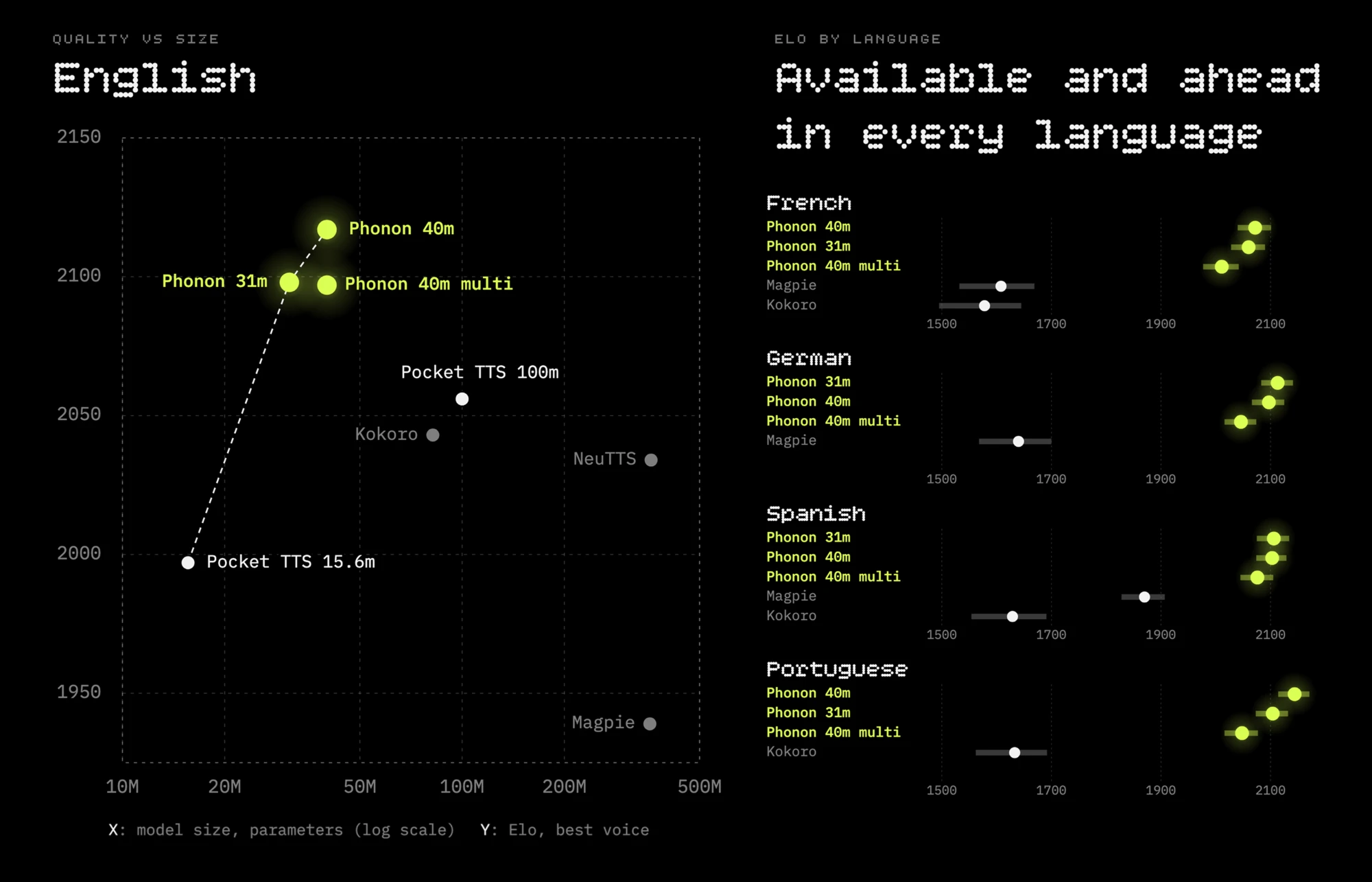
On the left, quality (Elo) relative to model size, in English. On the right, the comparison in French, German, Spanish, and Portuguese. The figures were published by Gradium itself.
Speed is impressive too. On a MacBook Air M5, using a single CPU core, Phonon 31m starts speaking in 13.6 milliseconds and generates audio 11.6 times faster than real time. On a Raspberry Pi 5, it still runs 3.7 times faster than real time.
Available languages
Phonon arrives on Ollama in five languages, with one model per language and a multilingual version that covers all of them:
| Model on Ollama | Language | Parameters | License |
|---|---|---|---|
phonon | English | 31M | Apache 2.0 |
phonon:40m-en | English | 40M | CC BY-NC 4.0 |
phonon:40m-pt | Portuguese | 40M | CC BY-NC 4.0 |
phonon:40m-es | Spanish | 40M | CC BY-NC 4.0 |
phonon:40m-fr | French | 40M | CC BY-NC 4.0 |
phonon:40m-de | German | 40M | CC BY-NC 4.0 |
phonon:40m-multilingual | All five languages | 40M | CC BY-NC 4.0 |
The default model, phonon, is the 31-million-parameter English version.
How to download it with Ollama
For now, voice models only work on macOS, on Macs with Apple Silicon, where Ollama uses Apple’s MLX framework to accelerate generation. Windows and Linux support has been promised but doesn’t have a date yet. You also need Ollama 0.40.11 or later.
Once those requirements are met, just pull the model and pass in the text:
ollama pull phonon
ollama run phonon "Hello! This audio was generated locally by Ollama."
To save the result to a file, simply redirect the output with > speech.wav. The --voice option lets you pick another voice from Gradium’s catalog, and the ollama show command lists the voices available in each model. You can also chain a language model and Phonon in a single line, with the first one writing and the second one speaking:
ollama run gemma4 --hidethinking "Tell me a fun fact about llamas in two sentences." | ollama run phonon
For developers, Phonon works through the /v1/audio/speech endpoint, which is compatible with the OpenAI API. Anyone already using the OpenAI SDK only needs to change the base URL to http://localhost:11434/v1. Audio comes out as 24 kHz mono WAV and is streamed, so playback can start before generation finishes.
According to Ollama, on a MacBook Pro with an M5 Max, generation was 35% faster than on Gradium’s own runtime, while keeping the same error rate as the reference implementation.
Watch the license
Here’s an important detail. Only the default model, the English Phonon 31m, uses the Apache 2.0 license, which allows commercial use. All 40-million-parameter models, including the Portuguese and Spanish ones, are under the CC BY-NC 4.0 license, which restricts use to noncommercial purposes.
In practice, you can freely test, study, and use the 40M models in personal projects. A company that wants to put the Portuguese or Spanish voice into a product, however, needs to negotiate directly with Gradium, which offers custom models for business customers.
Why is Ollama so popular?
One of the reasons Ollama became so popular is its simplicity. On macOS and Windows, you install it with a regular installer downloaded from ollama.com/download. On Linux, a single command does it:
curl -fsSL https://ollama.com/install.sh | sh
After that, running a model is a matter of typing ollama run followed by the model’s name. Ollama downloads the files, loads the model, and opens a conversation right in the terminal.
At the same time, it runs a local server on port 11434, with its own API and compatibility with the OpenAI API. This means many of the tools and libraries that already talk to OpenAI work with local models just by changing the address.
Not just free: Ollama’s plans
Running models on your own computer is, and remains, free and unlimited. But Ollama also has a cloud service that runs larger models on the company’s servers and is billed by usage, per million tokens depending on the model. Each plan includes a monthly amount of credits:
| Plan | Price | Included monthly credits | Concurrent requests |
|---|---|---|---|
| Free | Free | Starter credits and access to starter models | 1 |
| Pro | $20/month or $200/year | $60 and access to larger models | 3 |
| Max | $100/month | $300 and early access to new models | 10 |
| Team | $500/month (early access) | $1,000 shared, with unlimited users | 10 |
| Enterprise | Custom | Volume pricing, access controls, and budgets | — |
On the free plan, you can also buy extra credits to unlock every cloud model, with no service fees.
Off-peak usage, meaning outside 12:00 to 18:00 UTC on weekdays and all day on weekends, is cheaper. Included credits don’t roll over from one month to the next.
On privacy, Ollama says prompts and responses are never logged or used to train models. The infrastructure is mainly in the United States, with possible routing to Europe, and runs on Nvidia partners that must follow zero data retention policies.
Listen to Phonon in Portuguese, English, and Spanish
Ollama’s official announcement includes audio samples generated with Phonon, all unedited. You can hear the Davi voice in Portuguese, the Candela voice in Spanish, and four English voices with American and British accents, plus samples in French and German. Each sample comes with the command used to generate it.
Listen to the samples on the Ollama blog